Last updated July 2026
If you are confirmed for the ISW Facilitator Registry, you are sent an email with your assigned username and an initial password. You can change your password to one you select. See the directions in Resetting Password further below. Log in with your username (or the email you provided when you completed the ISW Facilitator Registry Form) and your password. If you later forget the password you selected, you can create a new password by following the directions on Resetting Password (further below).
- To access your ISW Website account, go to: https://iswnetwork.ca/
- Click Login on the main menu
- Enter your username or email address and your password
- Complete the anti-spam check
- Click Log In
Reset your password when you can’t login to your account, or you’ve forgotten your password. To reset your password, you must use the same email you provided on your ISW Registry Form, and you must still have access to that email account. If you are uncertain about the email to use, use the Contact Form to tell us your name and the username and/or email you tried to use to Login, so we can investigate.
- To reset your account password, go to: https://iswnetwork.ca/
- Click Login from the main menu
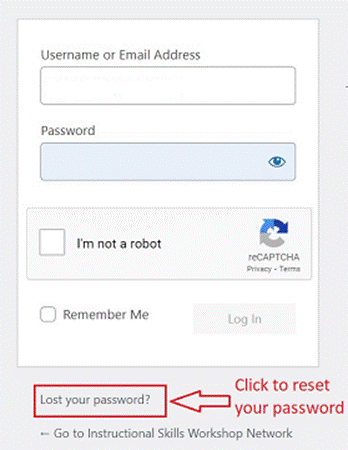
- Click Lost your Password? below the login box (see the image below)
- On the new window that appears, enter your username or email address and complete the anti-spam check
- Click Get New Password
- Check your email account for password reset instructions
- Follow the link in the email, create a new password, and then Login to your account
If you do not receive an email after 15 minutes, check your spam or junk folders for an email. Still nothing? Use the website Contact Form to send us your name and the username and/or email address you are using to try to reset your Password, so we can investigate.
To access password-protected ISW resources, you must first sign in to your account.
- Go to: https://iswnetwork.ca/
- Click Login from the main menu
- Once logged in, you’ll see a welcome message with your first name in the top right corner of the screen
- Hover over My Account in the main menu
- Select My Resources from the drop-down menu. (Note that My Resources will only appear on the Drop-down menu when you are logged in to your account.)
- Your available resources will be listed there within various Folders
- When logged in to your Account, you can also access various ISW Forms under My Account on the main menu.
If you are already on the ISW Registry, use the Update Contact Information Form to let us know about any changes to your contact information or affiliation.